Affiliate Disclosure: This article contains affiliate links. If you sign up through our link, we may earn a commission at no extra cost to you. We only recommend tools we genuinely believe provide value. Read our full disclaimer
Leadpages Review 2026: The Best Landing Page Builder for Small Businesses and Solopreneurs?
Most small businesses are losing leads every day to landing pages that take too long to build, look amateur, and never get optimised because A/B testing feels too complicated. Leadpages was built specifically to fix that — unlimited high-converting pages, a real-time conversion coach, and a price that does not scale against your success. Here is our honest review of whether it delivers.
Leadpages Review: What Is Leadpages and Who Is It Built For?
🎯 The Core Value Proposition
This Leadpages review covers the platform in full — what it does exceptionally well, where it falls short, and whether it is the right choice for your business in 2026. Leadpages is a landing page and website builder purpose-built for conversion. Founded in 2012 in Minneapolis, it has carved out a very specific niche in the market: delivering affordable, high-converting page building for solopreneurs and small businesses who need results without the complexity, cost, or learning curve of enterprise marketing platforms. Furthermore, Leadpages is explicit about what it is not trying to be — it is not an all-in-one marketing suite competing with HubSpot or Marketo. Instead, it focuses on doing one thing better than almost anyone else: turning website visitors into leads and customers through optimised landing pages.
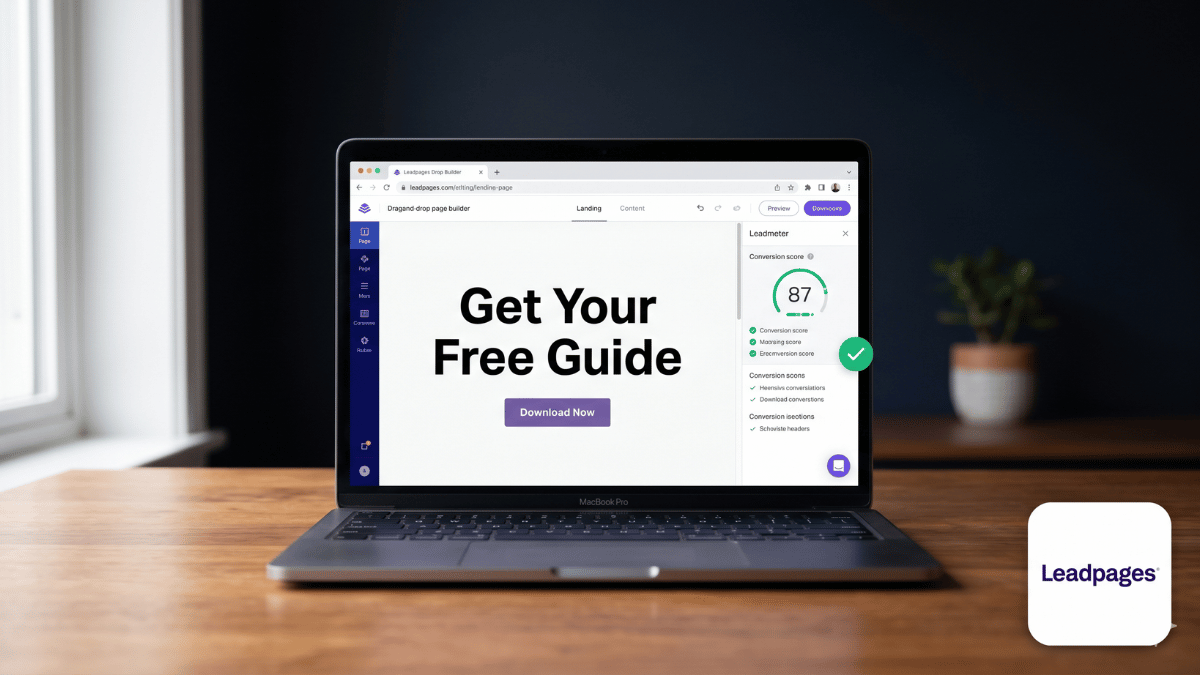
What sets Leadpages apart from the dozens of other landing page builders in the market is its philosophy around pricing and conversion. Unlike competitors such as Unbounce or Instapage, Leadpages does not charge more as your traffic or conversions grow. Consequently, the same monthly fee covers unlimited visitors and unlimited leads regardless of how successful your campaigns become. In addition, Leadpages includes a Leadmeter — a real-time conversion scoring tool that analyses your page as you build it and provides specific, data-driven recommendations for improving conversion rate before you publish. As a result, even non-designers can build pages with measurable confidence rather than guessing whether their layout will convert.
📊 Leadpages in Numbers
In 2026, Leadpages serves over 466,000 businesses worldwide, processes 9.1 million leads per month, and reports that its users achieve conversion rates five times higher than the industry average. The platform has been extended beyond landing pages to include a full website builder, pop-ups, alert bars, checkout pages, and AI-powered content generation — all at no additional cost on paid plans. Leadpages has been recognised as one of the most effective and affordable conversion platforms available for small businesses by G2, Capterra, and independent reviewers including TechRadar and Venture Harbour.
Try Leadpages free for 14 days — no credit card required
Build your first landing page, test it live, and see conversion results before paying anything.
Who Is Leadpages Best For?
Based on our Leadpages review research and verified user data, the platform delivers the strongest results for these specific business types and use cases:
Solopreneurs and Freelancers
Leadpages was built with solo operators in mind. The drag-and-drop builder requires no design or coding skills, templates are conversion-tested and ready to publish quickly, and the pricing is designed to remain affordable even as your business grows. Consequently, it is one of the most cost-effective ways for a one-person business to build a professional web presence and lead generation system without hiring a developer or designer.
Small Businesses and Local Service Providers
Business coaches, fitness practitioners, real estate agents, contractors, and local service businesses use Leadpages to build lead capture pages, appointment booking pages, and simple websites that would otherwise require hiring a web developer. The platform is particularly strong for businesses running paid advertising campaigns on Facebook, Google, or Instagram, where a dedicated landing page consistently outperforms sending traffic to a homepage.
Course Creators, Coaches, and Online Educators
Leadpages includes checkout pages with payment processing, webinar registration templates, lead magnet delivery automation, and email opt-in forms that connect directly to major email marketing platforms. As a result, creators who sell courses, coaching programmes, or digital products can build an entire lead-to-sale funnel — from opt-in to checkout — without any additional tools in many cases.
Digital Marketers Running Ad Campaigns
For marketers running pay-per-click campaigns on Google or Facebook, Leadpages provides dedicated landing pages that can be built and live in under 30 minutes, with A/B testing on Pro plans to optimise conversion rate over time. The unlimited traffic policy means scaling a winning campaign does not trigger unexpected cost increases — a frustration that specifically affects users of Instapage and Unbounce at higher volume.
E-commerce and Product Sellers
Leadpages supports sales and checkout pages with payment processing integration, making it suitable for selling digital products, physical goods, or consultancy packages directly through a landing page without needing a full e-commerce platform. Furthermore, the Shopify integration allows e-commerce stores to use Leadpages for high-converting product campaign pages that outperform standard Shopify themes in conversion-focused environments.
Leadpages Review: Key Features and How They Work
In this section of our Leadpages review, we cover each major feature category with specifics on what it does and how it performs in practice:
🏗️ Page Builder and Templates
Drag-and-Drop Page Builder
Leadpages uses a drag-and-drop visual editor where you build pages by placing, resizing, and customising elements directly on the canvas. The interface is notably cleaner and less overwhelming than competitors like ClickFunnels. New users consistently report going from zero to a published landing page within 30 minutes on their first attempt — a benchmark that most enterprise page builders cannot match. Furthermore, the builder maintains the layout across desktop and mobile views, automatically adjusting elements for mobile responsiveness without separate mobile editing required.
200+ Conversion-Optimised Templates
Leadpages provides over 200 mobile-responsive templates covering every major use case: lead capture pages, sales pages, webinar registration, thank-you pages, checkout pages, coming soon pages, event pages, and product launch pages. Notably, templates are sorted by conversion rate rather than just aesthetics — so the highest-performing designs appear first. This data-driven template ordering is a meaningful differentiator over platforms that sort by design style alone, and it gives non-marketers an immediate head start on conversion without needing to know which design principles drive results.
Website Builder Included
In addition to standalone landing pages, Leadpages includes a full website builder at no extra cost on all paid plans. For small businesses that need a simple five to fifteen page website — home, about, services, contact, and a blog — this eliminates the need for a separate website platform. It is not a replacement for WordPress for content-heavy sites, but for conversion-focused businesses that primarily want a website to support lead generation rather than content publishing, it works well and keeps everything in one platform.
AI Copy Generation and Image Creation
Leadpages includes built-in AI tools for generating headline copy, body text, and images directly within the editor at no additional cost. This eliminates the need for a separate AI writing subscription when building pages. The AI tools are genuinely useful for generating first-draft copy that you can then refine — particularly for headline variations during A/B testing, where generating multiple options quickly has direct conversion value.
📈 Conversion Optimization Features
Leadmeter — Real-Time Conversion Scoring
Leadmeter is one of Leadpages’ most distinctive features and a genuine differentiator in the market. As you build or edit a landing page, Leadmeter analyses the page in real time and displays a conversion score alongside specific recommendations for improvement. These recommendations are data-driven — based on patterns from pages that have driven high conversion rates across Leadpages’ user base. Suggestions might include tightening your headline, reducing form fields, adding a stronger call-to-action, or removing distracting navigation links. Consequently, even first-time page builders receive expert conversion guidance at the moment they need it rather than after publishing a page that underperforms.
A/B Testing
A/B testing is available on the Pro plan, allowing you to create two versions of any landing page, split traffic between them, and identify which version generates more conversions over time. This takes the guesswork out of page optimisation: instead of assuming which headline, button colour, or layout performs better, you have statistically validated data. The testing interface is straightforward — create a variation, set the traffic split percentage, and Leadpages automatically tracks and reports the results in your analytics dashboard.
Pop-ups and Alert Bars
All paid plans include unlimited pop-ups and alert bars that can be embedded on any website, not just Leadpages-hosted pages. Pop-ups can be triggered by time on page, scroll depth, exit intent, or button click. Alert bars appear at the top of a page to deliver promotional messages or time-sensitive offers. Both are built with the same conversion-focused design principles as Leadpages’ landing page templates, and they include the same Leadmeter scoring to help you optimise before publishing.
Lead Magnet Delivery
Leadpages includes built-in lead magnet delivery — the ability to automatically send a digital download to someone immediately after they submit an opt-in form. This eliminates the need to configure a separate email automation sequence just to deliver a free guide, checklist, or resource. Furthermore, the lead capture data flows directly into your connected email marketing platform, so the subscriber enters your list and receives the lead magnet simultaneously without any manual steps.
🔗 Integrations and Publishing
40+ Integrations
Leadpages connects with over 40 popular marketing tools including Mailchimp, AWeber, Constant Contact, ConvertKit, ActiveCampaign, HubSpot, Salesforce, Shopify, WordPress, Zapier, Google Analytics, and Facebook Pixel. For most small businesses, the integration ecosystem covers the tools they already use. Moreover, the Zapier connection extends this to thousands of additional applications for teams with custom workflow requirements.
Flexible Publishing Options
Leadpages pages can be published in three ways: on a Leadpages-hosted subdomain (yourname.lpages.co), on your own custom domain (included from Standard plan), or embedded on an existing WordPress site via the Leadpages WordPress plugin. This flexibility means you can use Leadpages alongside your existing website rather than replacing it, embedding specific high-converting pages within your current domain structure.
Checkout Pages and Payments
Leadpages supports checkout pages with Stripe integration for processing payments directly through your landing pages. This allows you to sell digital products, consultancy packages, or event tickets without needing a separate e-commerce platform. The checkout experience is straightforward to set up and can be embedded as a pop-up checkout on any landing page, reducing the friction between interest and purchase.
Leadpages Review: Pricing Plans and Value Analysis
Leadpages offers two main paid plans plus a 14-day free trial. Here is a clear breakdown of what each plan includes and the pricing reality you need to understand before choosing:
Free Trial
$0 for 14 days
No credit card required
Full access to all Pro features for 14 days. Build pages, test live traffic, connect integrations, and evaluate conversion performance before paying. The most risk-free way to determine whether Leadpages fits your specific use case.
Standard
$37/mo
Billed annually · $49/mo monthly
5 landing pages, 1 custom domain, unlimited traffic and leads, unlimited pop-ups and alert bars, lead magnet delivery, 40+ integrations, website builder, AI tools, Leadmeter. Best starting point for solopreneurs and small businesses.
Pro
$74/mo
Billed annually · $99/mo monthly
Unlimited landing pages, 3 custom domains, A/B testing, online payments and checkout pages, client sub-accounts, advanced integrations, and priority support. The right choice when you need A/B testing or want to sell directly through your pages.
The Standard Plan’s 5-Page Limit: Is It a Problem?
The Standard plan limits you to 5 landing pages, which is the most commonly cited limitation in user reviews. For most solopreneurs and small businesses running one or two focused campaigns, 5 pages is sufficient. However, if you run multiple simultaneous campaigns, need separate pages for different products, or want to A/B test pages (which requires two versions), the Pro plan at $74 per month is the more practical option. Furthermore, A/B testing is Pro-only — a notable restriction given that systematic page testing is one of Leadpages’ core value propositions. Try the platform via our free trial link before choosing a plan.
📊 How Leadpages Pricing Compares
One of the strongest points in this Leadpages review is the platform’s pricing philosophy. Unlike Instapage, which starts at $299 per month, or Unbounce at $99 per month, Leadpages is genuinely accessible for small businesses. Moreover, none of Leadpages’ plans add surcharges for higher traffic or conversion volumes. Consequently, a business running a high-volume ad campaign pays exactly the same monthly fee as one with minimal traffic — which is a meaningful financial advantage as campaigns scale. The 39% savings available on annual billing brings the Standard plan to $37 per month, making it one of the most affordable professional landing page solutions available in 2026.
Leadpages Review: Honest Pros and Cons
After thorough research and analysis of verified user reviews from G2, Capterra, Trustpilot, and independent publications, here is our balanced assessment:
✅ What Leadpages Does Well
- Fastest time-to-published-page in the category — most users live within 30 minutes
- Leadmeter real-time conversion coaching is a genuine differentiator — no other platform offers this
- Unlimited traffic and leads on all plans — no overage fees ever, regardless of campaign success
- Templates sorted by conversion rate, not aesthetics — immediately useful for non-marketers
- Website builder included at no extra cost — reduces tool sprawl for simple business websites
- AI copy and image generation built in — no separate subscription required
- Lead magnet delivery automated without email platform configuration
- 14-day free trial with full Pro features, no credit card required
- Significantly more affordable than Instapage or Unbounce at comparable feature levels
- Stripe checkout integration for selling directly through landing pages
- Published in 2012 — mature platform with proven long-term reliability
- Connects directly with Mailchimp, ConvertKit, ActiveCampaign, HubSpot, and 40+ other tools
❌ Where Leadpages Falls Short
- Standard plan limited to 5 landing pages — restrictive for multi-campaign marketers
- A/B testing is Pro-only — a significant limitation for Standard plan users focused on optimisation
- Not a full marketing automation platform — no native email marketing, CRM, or advanced funnel logic
- The builder, while easy, has less design flexibility than Unbounce’s freeform canvas
- Some users report templates can feel dated compared to newer visual-first builders like Carrd or Webflow
- Blog functionality in the website builder is limited — not suitable for content-heavy sites
- Customer support primarily via chat and email — no dedicated phone support on lower tiers
Leadpages Review: How It Compares to Alternatives
To complete this Leadpages review honestly, here is how it stacks up against the main alternatives across the key criteria that matter most to small businesses:
| Feature | Leadpages | Unbounce | Instapage | ClickFunnels |
|---|---|---|---|---|
| Starting Price (annual) | $37/mo | $74/mo | $199/mo | $81/mo |
| Unlimited Traffic | ✓ All plans | Capped on lower plans | ✓ | ✓ |
| Real-Time Conversion Score | ✓ Leadmeter | ✗ | ✗ | ✗ |
| A/B Testing | Pro plan only | ✓ All plans | ✓ All plans | ✓ |
| Website Builder Included | ✓ | ✗ | ✗ | ✓ |
| AI Copy Generation | ✓ Built-in | ✓ | ✓ | Limited |
| Free Trial | ✓ 14 days | ✓ 14 days | ✗ | ✓ 14 days |
| Templates | 200+ | 100+ | 500+ | 100+ |
| Best For | SMBs, solopreneurs, affordability | Agencies, design flexibility | Enterprise, personalisation | Full sales funnels |
Leadpages vs Unbounce: Which Should You Choose?
Unbounce offers more design freedom with a freeform canvas editor and A/B testing on all plans, making it stronger for agencies or design-led teams. However, Unbounce starts at twice the price of Leadpages and charges for conversion goals on higher tiers. Leadpages is the better choice for small businesses that want strong conversion performance, the Leadmeter coaching system, and a significantly lower cost of entry. If budget is not a constraint and design flexibility is a priority, Unbounce is worth evaluating. For most solopreneurs and small business owners, Leadpages delivers better value at every price point.
🏆 Leadpages Review 2026: Our Final Verdict
Based on our comprehensive Leadpages review, Leadpages earns a strong recommendation for solopreneurs and small businesses that need to generate leads and capture customers through high-converting landing pages without overpaying for enterprise complexity. The Leadmeter real-time conversion coaching is a genuinely unique feature that no competitor offers, and the unlimited traffic policy removes the financial ceiling that frustrates marketers as their campaigns scale. Furthermore, the inclusion of a website builder, AI copy tools, and lead magnet delivery at no extra cost makes the value proposition genuinely difficult to match at this price point.
The two limitations worth noting are the 5-page cap on the Standard plan and the fact that A/B testing is reserved for Pro. For marketers running multiple simultaneous campaigns who need systematic testing, the Pro plan at $74 per month is the practical choice and still significantly cheaper than most enterprise alternatives. For solopreneurs or businesses running one focused campaign at a time, the Standard plan at $37 per month is one of the most affordable and capable conversion tools available in the market today.
✅ Leadpages is right for you if:
- You need high-converting landing pages without design or coding skills
- You want real-time guidance on improving conversion rate as you build
- You run paid advertising campaigns that need dedicated landing pages
- You want unlimited traffic without overage fees at any scale
- You are a solopreneur or small business on a sensible marketing budget
- You want a simple website builder included without an additional platform
⚠️ Consider alternatives if:
- You need more than 5 pages and do not want to upgrade to Pro
- You need A/B testing without paying for Pro
- You need a full marketing automation platform with CRM and email built in
- You need maximum design freedom with pixel-perfect freeform editing
- You run a content-heavy site requiring a powerful blogging platform
Try Leadpages Free for 14 Days
No credit card required. Build your first landing page and test it live before paying anything.
Standard from $37/month · Pro from $74/month · Annual billing saves 39%