How to Choose a CRM for Your Sales Team in 2026
How to Choose a CRM for Your Sales Team in 2026: The Complete Buying Guide
Learning how to choose a CRM is one of the most important decisions sales leaders make in 2026. Specifically, the wrong CRM costs sales teams thousands of dollars and months of lost productivity. Moreover, switching CRMs later disrupts pipelines, breaks integrations, and frustrates sales reps. This complete guide on how to choose a CRM walks through every step of the evaluation process. As a result, you can confidently select the right CRM software for sales the first time.
Why Choosing a CRM the Right Way Matters in 2026
💸 The Real Cost of Choosing Wrong
Choosing a CRM wrong costs sales teams more than just the subscription fee. Specifically, implementation, training, data migration, and lost productivity multiply the actual cost significantly. Moreover, sales reps who hate their CRM avoid logging activity, which destroys pipeline visibility and forecasting accuracy.
For growing businesses, this creates compounding problems. Specifically, missing CRM data means missing forecast accuracy, which means missing revenue targets. Additionally, switching CRMs later costs 3-5x more than choosing correctly the first time. Consequently, the effort invested in choosing a CRM systematically delivers massive ROI throughout the sales organization’s lifetime.
📊 The Statistics That Matter
Industry research reveals that 60% of sales teams switch CRMs within 36 months of initial deployment. Moreover, the average cost of switching includes 3-6 months of reduced productivity plus implementation fees. Additionally, sales rep adoption averages just 50% on poorly-chosen CRMs versus 85%+ on well-matched platforms. Therefore, the difference between choosing right and choosing wrong is genuinely measurable in revenue terms.
🚀 What This Guide Will Teach You
This guide on how to choose a CRM walks through five sequential evaluation steps. Specifically, each step builds on the previous decision to narrow your shortlist progressively. Moreover, the guide includes specific tool recommendations across major use cases. Additionally, common mistakes and a complete buying checklist help avoid the pitfalls most sales teams encounter.
Step-by-Step Guide: How to Choose a CRM in 5 Decisions
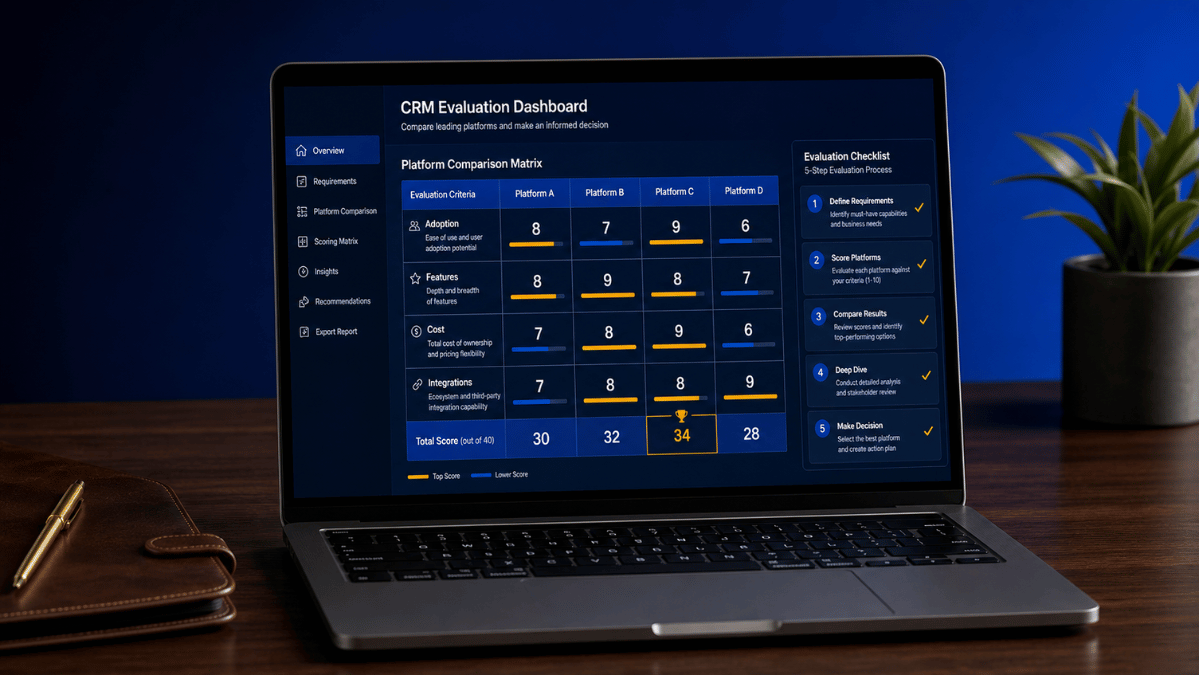
Here is the systematic 5-step approach on how to choose a CRM. Moreover, each step takes 2-4 hours of focused work. Therefore, the complete process spans about 2-3 weeks of part-time evaluation effort.
📝 Step 1: Define Your Sales Process Clearly
Before evaluating any CRM software, document your actual sales process step-by-step. Specifically, write down every stage from lead generation through closed-won deal. Moreover, identify decision points, qualification criteria, and stakeholder interactions at each stage. Additionally, note where deals typically stall or drop off.
For most B2B businesses, the sales process includes lead generation, qualification, discovery, demo or proposal, negotiation, and closing. However, your specific industry and customer type create unique variations. As a result, mapping your real process reveals which CRM features genuinely matter versus which are marketing hype. Therefore, this step prevents shopping for features you will never use.
🎯 Step 2: Identify Must-Have Features vs Nice-to-Haves
CRM platforms compete on hundreds of features, but only 8-12 actually matter for most sales teams. Specifically, separate your evaluation criteria into “must-haves” (deal-breakers) and “nice-to-haves” (preferred but not required). Moreover, this clarity prevents vendor sales reps from steering you toward features you do not actually need.
Common must-have CRM features include contact and account management, deal pipeline tracking, email integration, mobile access, and basic reporting. Additionally, common nice-to-haves include AI insights, advanced automation, custom workflows, and predictive analytics. Therefore, ranking features by genuine business need creates objective evaluation criteria. Consequently, this transforms subjective vendor demos into objective comparison data.
💰 Step 3: Set Your Realistic Budget Including Hidden Costs
CRM pricing pages show subscription fees but hide implementation costs that often exceed annual subscriptions. Specifically, total cost of ownership includes setup fees, data migration, training, integrations, ongoing administration, and customization. Moreover, mid-market CRMs typically cost 2-3x the listed subscription when fully implemented.
For accurate budgeting, calculate three-year total cost of ownership rather than just monthly subscription. Additionally, account for sales rep time spent learning the new system (estimated 20-40 hours per rep). Therefore, a $50/user/month CRM deploying to 10 reps actually costs significantly more than the $6,000 annual subscription suggests. Consequently, realistic budgeting prevents nasty surprises mid-implementation.
🔌 Step 4: Evaluate Integrations With Your Existing Stack
A CRM that does not integrate with your existing tools creates daily friction for sales reps. Specifically, list every tool your sales team uses today including email, calendar, marketing automation, communication platforms, and finance systems. Moreover, verify each tool integrates natively with each CRM finalist before testing.
Critical integrations for most sales teams include Gmail or Outlook for email, Google Calendar or Microsoft Calendar for scheduling, marketing automation platforms for lead handoff, and Slack or Microsoft Teams for communication. Additionally, sales prospecting tools like our Apollo.io review covers should integrate seamlessly to enable data flow between systems. Therefore, integration depth often matters more than feature parity.
🧪 Step 5: Test 2-3 Finalists With Free Trials
Demos and sales calls cannot replace actually using a CRM with real data. Specifically, narrow your evaluation to 2-3 finalists, then run real sales scenarios in each free trial. Moreover, involve actual sales reps in the testing rather than just evaluating from a manager perspective. As a result, you discover usability issues that demos never reveal.
Most enterprise CRMs offer 14-30 day free trials, while many SMB-focused platforms offer free plans for ongoing evaluation. Additionally, build a standardized test scenario covering lead import, pipeline creation, deal progression, and reporting. Consequently, structured testing produces objective comparison data rather than subjective preferences. Therefore, the testing phase prevents post-purchase regret.
CRM Comparison Guide for Sales Teams: Side-by-Side Evaluation
A proper CRM comparison guide evaluates platforms across consistent criteria rather than feature-by-feature noise. Specifically, this comparison framework focuses on the dimensions that genuinely affect sales team success. Moreover, applying this framework to any CRM finalists creates apples-to-apples comparisons.
📊 The 8 Comparison Criteria That Matter
| Criterion | Why It Matters | How to Evaluate |
|---|---|---|
| Sales Rep Adoption | CRM with low adoption fails despite features | Test with actual reps, measure log frequency |
| Pipeline Visualization | Forecasting accuracy depends on pipeline clarity | Build real pipeline during free trial |
| Email Integration | Reps spend 28% of time in email — must integrate | Test Gmail/Outlook plugin daily for one week |
| Mobile Experience | Field reps need mobile access for updates | Have field reps test mobile app for 5 days |
| Reporting Flexibility | Custom reports drive sales decisions | Build 3 custom reports during evaluation |
| Total Cost of Ownership | Implementation often exceeds subscription | Get implementation quotes from 2 partners |
| Data Migration Path | Existing data must transfer cleanly | Test migration with real sample data |
| Vendor Stability | CRM vendor must exist long-term | Check funding, customer count, growth rate |
🏆 Major CRM Categories Compared
CRM platforms fall into distinct categories serving different business sizes and use cases. Specifically, choosing the right category matters more than choosing the best individual platform within the wrong category. Therefore, identifying your category correctly is foundational to choosing a CRM well.
| Category | Best For | Typical Price Range | Examples |
|---|---|---|---|
| Sales-First CRMs | SMB sales teams 2-50 reps | $15-$99/user/mo | Pipedrive, Close, HubSpot Sales |
| Sales Intelligence + CRM | Mid-market outbound teams | $49-$199/user/mo | Apollo.io, ZoomInfo, Outreach |
| All-in-One Marketing + Sales | SMBs needing email + CRM | $0-$100/user/mo | HubSpot, Brevo, ActiveCampaign |
| Enterprise CRM Platforms | 500+ employee organizations | $150-$500+/user/mo | Salesforce, Microsoft Dynamics, Oracle |
| Industry-Specific CRMs | Vertical use cases | Variable | Real estate, financial services, etc. |
Best CRM for Sales Team by Specific Use Case
The best CRM for sales team depends entirely on specific use case rather than universal “best” rankings. Specifically, different sales motions require different CRM strengths. Moreover, matching CRM strengths to your actual sales motion delivers significantly better outcomes than picking the most popular option.
🚀 Best CRM for Outbound Sales Teams
Outbound sales teams need CRM platforms that combine prospecting data with deal management. Specifically, sales intelligence + CRM platforms reduce the tool stack while delivering complete outbound workflows. Moreover, the integration between prospecting and pipeline tracking eliminates manual data entry.
For outbound teams, our Apollo.io review covers the leading sales intelligence platform with built-in CRM. Additionally, our ZoomInfo review covers the enterprise-grade alternative with deeper data sources. Both platforms eliminate the friction between finding prospects and managing deals. Consequently, outbound velocity improves dramatically when prospecting and CRM live in one platform.
📞 Best CRM for Inbound Sales Teams
Inbound sales teams receive leads from marketing rather than generating them through prospecting. Specifically, the CRM priorities shift toward lead routing, qualification automation, and attribution to marketing sources. Moreover, integration with marketing automation and call tracking matters more than outbound prospecting features.
For inbound teams, our CallRail review covers the leading call attribution platform that integrates with most CRMs. Additionally, our Brevo review covers a marketing platform with built-in free CRM perfect for inbound-heavy SMBs. Therefore, inbound teams benefit from marketing-CRM integration depth rather than prospecting features.
📧 Best CRM for Cold Email-Driven Sales
Cold email-focused sales teams need CRM platforms with strong email automation and deliverability features. Specifically, email sequences, A/B testing, and deliverability monitoring matter more than traditional pipeline features. Moreover, the CRM must handle high-volume sending without triggering spam filters.
For cold email teams, our Reply.io review covers the leading cold email platform with native CRM functionality. Additionally, this combines outbound automation with deal tracking in one workflow. Consequently, cold email teams avoid the data sync problems between separate email and CRM tools.
🧠 Best CRM for Data-Driven Sales Operations
Data-driven sales operations teams prioritize CRM enrichment, contact intelligence, and reporting depth. Specifically, the ability to enrich existing CRM records with current contact data matters more than core CRM features. Moreover, integration with research and intelligence tools determines actual data quality.
For data-driven teams, our Lusha review covers the leading CRM enrichment platform that adds contact data to existing CRM records. Additionally, this works alongside your primary CRM rather than replacing it. Therefore, data-driven sales operations benefit from layering enrichment tools on top of solid foundational CRM platforms.
Sales CRM Categories Explained: Understanding Your Options
Before evaluating specific platforms, understanding sales CRM categories prevents costly mismatches. Specifically, each category serves distinct business sizes, sales motions, and budget ranges. Moreover, identifying your category narrows the evaluation from hundreds of options to a manageable shortlist.
🏢 Sales-First CRM Software
Sales-first CRM software focuses exclusively on sales workflows without trying to be everything. Specifically, these platforms excel at deal management, pipeline visualization, and sales rep productivity. Moreover, sales-first CRMs like Pipedrive and Close suit teams of 2-50 reps without complex marketing requirements.
The advantage of sales-first CRMs is depth in sales features without the complexity of broader platforms. Additionally, pricing typically falls in the $15-$99/user/month range, making them accessible to growing teams. However, integrating with separate marketing tools creates additional vendor management overhead. Therefore, this category suits teams where sales is clearly separated from marketing operations.
🧠 Sales Intelligence Combined With CRM
Sales intelligence platforms increasingly include native CRM functionality alongside prospecting data. Specifically, this combination eliminates the data sync problems between prospecting tools and traditional CRMs. Moreover, sales reps work in one platform rather than constantly switching contexts.
Examples include Apollo.io combining 275M+ contact database with full CRM features, and ZoomInfo offering enterprise prospecting alongside deal management. As a result, mid-market outbound teams get complete workflows in single subscriptions. Consequently, this category has grown rapidly through 2024-2026 as the unified approach proves operationally superior.
🎯 All-in-One Marketing and Sales Platforms
All-in-one platforms combine email marketing, marketing automation, and CRM in single subscriptions. Specifically, this approach suits SMBs that need both marketing and sales tools but cannot manage separate vendors. Moreover, the unified data model means leads flow seamlessly from marketing to sales without integration overhead.
Examples include HubSpot’s combined marketing + sales hub, Brevo’s email-CRM platform, and ActiveCampaign’s marketing automation with sales features. Additionally, free tiers available on HubSpot and Brevo make this category accessible to early-stage businesses. Therefore, all-in-one platforms suit SMBs prioritizing operational simplicity over best-of-breed features.
🏛️ Enterprise CRM Platforms
Enterprise CRM platforms serve organizations with 500+ employees, complex compliance requirements, and global operations. Specifically, Salesforce, Microsoft Dynamics 365, and Oracle CX dominate this category through depth of customization and ecosystem integrations. Moreover, enterprise platforms typically require dedicated administrators and significant implementation investment.
The pricing for enterprise CRM platforms ranges from $150-$500+/user/month with significant implementation costs on top. Additionally, total cost of ownership often reaches 3-5x annual subscription due to customization, integration, and administration overhead. Therefore, this category only makes sense for organizations with genuinely complex requirements that justify the investment.
CRM Buying Guide Checklist: 12 Questions to Ask Before Signing
Use this CRM buying guide checklist before signing any contract. Specifically, answering these 12 questions prevents the most common post-purchase regrets. Moreover, going through this checklist takes about 30 minutes per CRM finalist but saves months of pain later.
💰 Financial and Contractual Questions
1. What is the total cost over 3 years?
Calculate subscription, implementation, training, and customization costs across 36 months. Specifically, this prevents focusing only on monthly subscription while ignoring larger one-time costs. Moreover, three-year TCO comparisons reveal the true economics of CRM choices.
2. How long does implementation actually take?
Realistic implementation timelines often stretch 3-6 months for mid-market CRMs. Specifically, ask the vendor for case studies showing actual implementation time. Moreover, factor lost productivity during implementation into your cost calculations.
3. What does data migration involve?
Data migration is typically the most painful part of CRM transitions. Specifically, ask whether the vendor handles migration or whether you need third-party help. Additionally, request migration cost estimates and timeline expectations upfront.
4. How does data export work if you leave?
Some CRMs make leaving artificially difficult. Specifically, verify you can export all data in standard formats anytime. Moreover, this prevents vendor lock-in even if you sign a long-term contract.
🛠️ Technical and Operational Questions
5. Which integrations are native vs third-party?
Native integrations work better than third-party connectors. Specifically, ask which integrations are built and maintained by the CRM vendor versus relying on Zapier or independent developers. Moreover, native integrations rarely break compared to third-party alternatives.
6. How good is the mobile experience?
Field sales reps spend significant time in mobile CRM apps. Specifically, test the mobile app for 5 days during evaluation rather than just demoing it. Additionally, mobile usability often differs dramatically from desktop experience.
7. What security and compliance features exist?
Sales teams handle sensitive customer data requiring proper security. Specifically, verify SOC 2 Type II certification, GDPR compliance, and data encryption at rest and in transit. Moreover, regulated industries need additional compliance like HIPAA or financial certifications.
8. What is the actual customer support quality?
Vendor support quality varies dramatically across plan tiers. Specifically, check whether support is included in your tier or costs extra. Additionally, read recent G2 reviews specifically about support experiences. Therefore, support quality often determines daily user satisfaction more than features.
📈 Growth and Strategic Questions
9. How does pricing scale as you grow?
CRM costs scale with team size and feature usage. Specifically, calculate costs at projected team size 24 months from now. Moreover, understand whether features unlock at usage tiers or require plan upgrades.
10. What customization is possible?
Different CRMs offer different customization depth. Specifically, custom fields, workflows, and reports vary significantly across platforms. Additionally, customization often requires technical resources or paid consultants.
11. Is the vendor financially stable?
CRM transitions are too painful to repeat due to vendor instability. Specifically, check funding, customer count, growth rate, and recent leadership changes. Moreover, check Crunchbase or vendor press releases for stability signals.
12. What training resources exist?
Training quality determines adoption speed and depth. Specifically, evaluate documentation, video courses, and certification programs. Additionally, vendor training quality often correlates with overall product maturity.
Common Mistakes When Choosing a CRM
Sales teams repeatedly make the same mistakes when choosing a CRM. Specifically, awareness of these common pitfalls prevents costly errors during evaluation. Moreover, sidestepping these mistakes saves the average sales team months of pain.
❌ Mistake 1: Choosing Based on Demos Alone
Vendor demos showcase the platform’s strengths while hiding weaknesses. Specifically, demo environments use perfectly clean data and pre-built workflows. Moreover, demo presenters know exactly which features to skip. As a result, demos rarely predict actual user experience accurately.
Instead, run free trials with real data and real users. Additionally, build the workflows your team actually uses rather than demo scenarios. Therefore, hands-on testing reveals usability issues that demos completely hide.
❌ Mistake 2: Ignoring Sales Rep Input
Managers often choose CRMs that look great in reports but frustrate sales reps daily. Specifically, low rep adoption destroys CRM value regardless of feature richness. Moreover, frustrated reps avoid logging activity, which destroys data quality and forecast accuracy.
Instead, involve actual sales reps in evaluation from day one. Additionally, weight rep usability feedback heavily in final decisions. Consequently, choosing a CRM your reps will actually use beats choosing the most feature-rich option.
❌ Mistake 3: Underestimating Implementation Cost
Subscription fees are typically 30-50% of total CRM cost. Specifically, implementation, customization, training, and integration add the rest. Moreover, internal time spent on implementation has significant opportunity cost beyond cash outlay.
Instead, budget realistically for total cost of ownership over three years. Additionally, get implementation quotes from certified partners before committing. Therefore, accurate budgeting prevents the budget overruns that strain CRM projects.
❌ Mistake 4: Skipping Reference Checks
Vendor case studies showcase only successful customers. Specifically, ask the vendor for references at companies similar to yours in size and industry. Moreover, talk to those references directly without vendor present.
Additionally, check independent review sites like Capterra and TrustRadius for unfiltered customer feedback. Therefore, balanced reference data prevents post-purchase regret. Consequently, this 2-hour effort during evaluation saves potential months of rework later.
Pairing Your CRM With the Right Marketing Stack
A great CRM works even better paired with the right marketing tools. Specifically, complete revenue operations span both sales and marketing functions seamlessly. Moreover, the right pairings create unified customer data flow rather than data silos.
🎨 Marketing Creative That Aligns With CRM Data
CRM data should inform marketing creative decisions for higher conversion rates. Specifically, our AdCreative.ai review covers the AI ad creative tool that benefits from CRM-derived audience insights. Moreover, surveys reveal customer pain points and language patterns that inform high-converting ad copy. Therefore, this combination creates evidence-based ad creative rather than assumption-based campaigns.
📧 Email Marketing Integration
Email marketing platforms must integrate seamlessly with your chosen CRM. Specifically, the lead-to-customer journey spans both systems continuously. Moreover, our Brevo review covers a marketing platform with built-in CRM perfect for businesses wanting unified workflows. As a result, businesses choosing all-in-one platforms eliminate integration complexity entirely.
🏆 How to Choose a CRM: Final Decision Framework
Choosing a CRM well comes down to systematic evaluation rather than feature comparisons. Specifically, the 5-step framework above narrows your shortlist objectively. Moreover, the 12-question buying checklist prevents post-purchase regret. Additionally, matching CRM category to your specific sales motion delivers significantly better outcomes than picking universal “best” options.
⚡ The 60-Second Decision Framework
For sales leaders short on time, here is the simplified framework. First, identify your primary sales motion: outbound, inbound, cold email, or data-driven. Second, match your motion to the appropriate CRM category. Third, shortlist 2-3 platforms within that category. Fourth, run free trials with real users for 14 days. Finally, pick the platform your sales reps actually want to use.
✅ Do this when choosing a CRM:
- Define your sales process before evaluating platforms
- Separate must-haves from nice-to-haves explicitly
- Calculate three-year total cost of ownership
- Test 2-3 finalists with real data and real reps
- Check independent reviews on G2 and Capterra
- Ask for references at similar-sized companies
- Verify integrations with your existing tools
⚠️ Avoid these mistakes:
- Choosing based on demos alone without hands-on testing
- Ignoring sales rep input on usability
- Underestimating implementation and training costs
- Skipping reference checks with similar customers
- Picking the most feature-rich option without matching needs
- Signing long contracts without trial period validation
Ready to Compare Specific CRM Platforms?
Read our detailed reviews of the leading CRM and sales intelligence platforms to find your perfect match.