What Is Dropshipping and How Does It Work in 2026?
What Is Dropshipping and How Does It Work in 2026?
You’ve heard the word. You’ve seen the YouTube ads promising passive income from a laptop on the beach. But what is dropshipping, really — how does it actually work, what does it cost to start, and is it still a viable business model in 2026? This guide answers all of it.
The Simple Explanation: What Is Dropshipping?
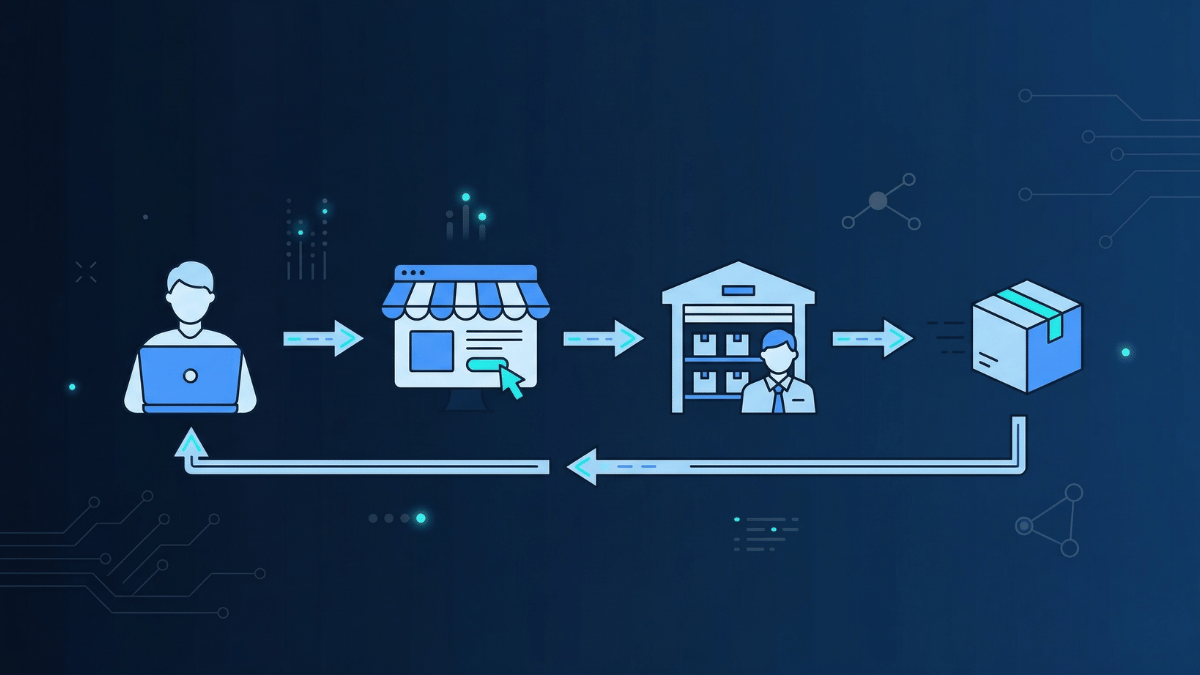
Dropshipping is a retail fulfillment method where a store owner sells products online without ever holding inventory. In simple terms, when a customer places an order, the store owner forwards it to a third-party supplier, who then packages and ships the product directly to the customer. As a result, the store owner never sees, touches, or stores the product at any point in the process. According to Shopify, dropshipping has become one of the most accessible ways for entrepreneurs to launch an online business with minimal upfront investment.
Think of it this way: you run the storefront and handle the marketing, while the supplier manages the warehouse and the shipping. Consequently, you keep the difference between what the customer paid you and what you paid the supplier as your profit margin.
💡 A Practical Dropshipping Example
A Simple Dropshipping Example
You find a wireless phone charger on a supplier platform for $8. You list it in your Shopify store for $24.99. A customer buys it. You place the order with your supplier for $8, providing the customer’s shipping address. The supplier ships it directly to your customer. You keep $16.99 profit, minus any advertising costs, without ever touching the product.
How the Dropshipping Process Works, Step by Step
The dropshipping process involves three parties: you (the store owner), your customer, and your supplier. Understanding exactly how these three parties interact is essential before you commit to the model. Here is how it flows from click to delivery:
🏪 Setting Up and Running Your Dropshipping Store
Set Up an Online Store
Start by creating an online store on a platform like Shopify or WooCommerce. Next, find products from a supplier or dropshipping marketplace, import them to your store, and set your own retail prices at a margin that covers your costs and profit.
A Customer Places an Order
When a customer visits your store, finds a product, and completes a purchase, they pay your retail price including shipping if applicable. The money lands in your account immediately, before you pay the supplier.
Forward the Order to Your Supplier
After receiving the order, place the same order with your supplier at the wholesale price, providing the customer’s name and shipping address. Most modern platforms do this automatically, so there is no need to forward anything manually.
The Supplier Ships Directly
The supplier packages and ships the product directly to your customer, often with your store’s branding on the packaging. As a result, the customer receives their order and sees your store name, not the supplier’s.
Keep the Profit Margin
The difference between what the customer paid and what you paid the supplier is your gross profit. From this, subtract advertising costs, platform fees, and transaction fees to calculate your net margin.
Handle Customer Service
While the supplier handles fulfillment, you remain responsible for customer service, including answering questions, managing returns, and resolving complaints. This is the part most new dropshippers significantly underestimate.
Dropshipping vs Traditional E-commerce
Understanding what makes dropshipping different from conventional retail helps you decide whether it’s the right model for your situation.
| Factor | Dropshipping | Traditional E-commerce |
|---|---|---|
| Upfront Inventory Cost | $0 — no inventory needed | $500–$50,000+ to stock products |
| Storage / Warehouse | Not required | Required — home, storage unit, or 3PL |
| Shipping & Fulfillment | Handled by supplier | You pack and ship orders yourself |
| Profit Margins | 15–30% gross (lower) | 40–70% gross (higher) |
| Product Control | Limited — depends on supplier | Full control over quality and packaging |
| Risk | Low — no unsold stock | Higher — unsold inventory is a loss |
| Scalability | Very easy to scale | Harder — requires more capital and logistics |
| Startup Speed | Days to launch | Weeks to months |
| Competition | Very high — low barrier to entry | Lower — higher barrier means fewer competitors |
Types of Dropshipping Models in 2026
Dropshipping is not one-size-fits-all. There are several distinct models, each with different risk levels, margins, and requirements.
AliExpress / Chinese Supplier Dropshipping
The most common starting point. You source products from Chinese suppliers via platforms like AliExpress or DSers and sell them globally. Very low product cost but slow shipping times (15–30 days) and variable quality. High competition. Best for testing products before committing to a niche.
US & EU Supplier Dropshipping
Source from vetted local suppliers for 2–7 day delivery. Higher product costs but lower refund rates, better quality, and happier customers. Platforms like Spocket specialize in connecting stores with US and EU suppliers. The premium option for building a real brand.
Print-on-Demand (POD)
A subcategory of dropshipping where you sell custom-designed products (t-shirts, mugs, phone cases, posters). The supplier prints your design on the product only when an order is placed. Zero upfront cost, your own unique designs, no inventory — but lower margins and longer production times.
High-Ticket Dropshipping
Selling expensive products ($200–$2,000+) with higher margins per sale. Fewer orders needed to reach a revenue target. Examples: furniture, outdoor equipment, specialist tools. Requires more trust-building, better customer service, and a professional store. Lower competition than low-ticket niches.
Private Label Dropshipping
Source generic products from manufacturers and have them branded with your own logo and packaging before shipping. Higher upfront cost for branding but significantly better margins and brand loyalty. The path from dropshipping to a real brand.
Amazon FBA + Dropshipping Hybrid
Some sellers combine dropshipping with Amazon FBA — dropshipping to test which products sell, then buying bulk inventory and fulfilling via Amazon once a winner is found. Reduces risk during the testing phase while scaling what works.
Dropshipping Pros & Cons — The Honest Truth
✅ Genuine Advantages
- Low startup cost — no inventory investment required
- No warehouse or storage — run from anywhere with WiFi
- Huge product range — test hundreds of products without financial risk
- Easy to scale — more orders don’t require more warehouse space
- Fast to launch — a basic store can be live in 24–48 hours
- Low overhead — your main costs are your store platform and advertising
- Location independent — genuinely run from anywhere
- Easy to pivot — switch products or niches without losing sunk inventory costs
❌ Real Challenges
- Lower margins — 15–30% gross vs 40–70% for private label
- High competition — low barrier means many competitors selling the same products
- Supplier dependency — out-of-stock, quality issues, and shipping delays are your problem
- Slow shipping (Chinese suppliers) — 15–30 day delivery creates customer complaints
- No inventory control — you can’t inspect what the supplier ships
- Customer service burden — you handle returns and complaints for products you never touched
- Advertising costs — most dropshippers rely heavily on paid ads, which eat into margins
- Low brand loyalty — customers often don’t know or care about your store specifically
How Much Does It Cost to Start Dropshipping?
One of dropshipping’s biggest selling points is its low startup cost compared to traditional retail. Here’s a realistic breakdown of what you’ll actually need to spend:
E-commerce Platform
$29–$79/mo
Shopify Basic or WooCommerce hosting
Your storefront. Shopify is the most popular choice for dropshipping — easy setup, reliable, and integrates with every major supplier platform.
Supplier Platform
$0–$99/mo
DSers (free) to Spocket ($39.99+)
Access to supplier catalogs. DSers (AliExpress) has a free plan. Premium platforms like Spocket charge monthly for access to US/EU suppliers and faster shipping.
Advertising
$300–$1,000/mo
Facebook, Instagram, TikTok Ads
The real cost of dropshipping. Most stores depend on paid advertising to drive traffic. Budget $300–$500 minimum for testing. Without traffic, no sales.
Domain & Branding
$10–$50/yr
One-time / annual
Your domain name and basic logo. A professional store name and logo are essential for customer trust — don’t skip this.
Realistic Startup Budget
To give your dropshipping store a genuine chance of success, budget $500–$1,500 for your first month. The breakdown: ~$29 platform, ~$40 supplier access, ~$10 domain, and $400–$1,000 in advertising to drive enough traffic to test your products. Anyone telling you dropshipping is free to start is ignoring the advertising cost — which is where most of the real investment goes.
Is It Still Worth Starting in 2026?
This is the question everyone asks, and the honest answer is: yes, but it is more competitive than it used to be, and the bar for success is considerably higher.
📈 The Market Is Still Growing Fast
The dropshipping market reached $401 billion in 2026 and is growing at over 21% annually. In addition, more than 27% of all online retailers now use the dropshipping fulfillment model. That is not a dying industry — it is a massive, expanding one. However, the same low barrier that makes it easy to start also means thousands of other people are launching the same types of stores, selling the same products from the same suppliers. As a result, standing out requires considerably more strategy than it did just a few years ago.
🏆 What It Takes to Win in 2026
What has changed in 2026 is specifically what it takes to win. For example, generic stores selling trending products from AliExpress have become much harder to profit from. Consequently, the dropshippers succeeding today are the ones who commit to a fundamentally different approach:
Pick a Specific Niche
Rather than a general store, successful dropshippers in 2026 focus on a specific audience — pet owners, outdoor enthusiasts, home bakers, gamers. A focused niche lets you build a brand, create relevant content, and target your ads precisely.
Use Fast, Local Suppliers
Customers in 2026 expect fast delivery. Stores using US and EU suppliers with 2–7 day shipping report up to 50% fewer customer complaints than those using slow Chinese suppliers. Fast shipping is now a competitive requirement, not a luxury.
Build a Real Brand
Branded packaging, a professional store design, consistent social media presence, and genuine customer service separate successful stores from fly-by-night operations. Customers need to trust you before they buy.
Diversify Traffic Sources
Stores dependent on a single paid ad platform are one algorithm change away from failure. Winning stores in 2026 combine paid ads with organic content, email marketing, and influencer partnerships to build sustainable traffic.
How to Start a Dropshipping Business in 2026
Here is a practical roadmap for starting a dropshipping business from scratch. According to Oberlo, most successful dropshippers follow a similar sequence of steps regardless of their niche or platform choice:
📋 Your Step-by-Step Dropshipping Launch Plan
Step 1: Choose Your Niche
Avoid selling everything to everyone. Instead, pick a specific product category you understand and can market to a defined audience. Research demand using Google Trends, Amazon bestsellers, and TikTok to identify products with consistent interest rather than temporary trends.
Step 2: Find a Reliable Supplier
Your supplier is the backbone of your dropshipping business. Research platforms like Spocket (US/EU), DSers (AliExpress), or CJDropshipping. Order product samples before listing them and verify quality, packaging, and shipping times personally before your customers experience them.
Step 3: Build Your Online Store
Set up your store on Shopify or WooCommerce. Choose a clean, professional theme and write original product descriptions rather than copying supplier text directly. Additionally, add trust signals such as reviews, a clear returns policy, contact information, and an About page.
Step 4: Import Products and Set Pricing
Use your supplier platform’s integration to import products to your store. Price products to maintain a healthy margin after advertising costs, typically 2.5 to 3x the supplier cost for low-ticket items. Factor in platform fees, transaction fees, and ad costs when calculating your pricing.
Step 5: Drive Traffic to Your Store
Paid social advertising on Facebook, Instagram, and TikTok is the fastest way to test products. Start with a small daily budget of $10 to $20 to test multiple products simultaneously. Identify winners, scale spend on what converts, and cut what does not perform.
Step 6: Optimize and Scale
Analyze your data regularly to understand which products sell, which ads convert, and which audiences respond. Improve product pages, reduce cart abandonment with email sequences, add upsells, and build repeat purchase flows. Dropshipping success is built through systematic optimization over months, not overnight.
6 Mistakes Most New Dropshippers Make
According to industry research, the primary failure reasons for dropshipping stores are poor product selection (35%), ineffective marketing (30%), and supplier quality issues (20%). Understanding these pitfalls in advance gives you a significant advantage over competitors who learn them the hard way. Here are the specific mistakes to avoid:
🚫 Product and Supplier Mistakes
Choosing Products Based on Personal Taste
Your personal preferences are not your customer’s preferences. Instead, validate product demand with data, including Google Trends, Amazon search volume, and TikTok engagement, before listing anything. What seems appealing to you and what the market will actually buy are often very different things.
Never Ordering Product Samples
Listing a product you have never seen or held is a recipe for customer complaints. Therefore, always order samples from any supplier you plan to work with. Verify the quality, packaging, and delivery time from personal experience, rather than relying solely on supplier claims.
Ignoring Shipping Times
84% of online shoppers say they are more likely to buy from stores that clearly display shipping times. Consequently, listing a product with 25-day shipping without being transparent about it generates refund requests, chargebacks, and negative reviews that can seriously damage your store’s reputation.
🚫 Marketing and Business Mistakes
Underestimating Advertising Costs
Paid ads are not optional for most dropshipping stores, and they are not cheap. Furthermore, many beginners spend their entire budget on ads before their store is ready to convert. Build a professional store, write compelling product descriptions, and get your pricing right before spending a dollar on advertising.
Selling in a Market That Is Too Broad
General stores that sell anything and everything are harder to market, harder to build trust with, and harder to rank in search. For example, a store focused on outdoor gear for dog owners will almost always outperform a generic home and lifestyle store by targeting a more defined audience.
Quitting Too Early
Dropshipping has a steep learning curve, and most stores are not profitable in month one. However, the businesses that survive the first year have a 50 to 60% chance of remaining profitable long-term. Therefore, treat your first 3 to 6 months as an education investment rather than an immediate income stream.
Most Profitable Niches to Consider in 2026
Product category selection is one of the most impactful decisions in dropshipping. These niches are showing strong demand, reasonable margins, and growing market interest in 2026:
Pet Products
The pet industry is one of the most recession-proof markets. Pet owners spend consistently and emotionally. Niche down further — pet accessories for large dogs, cat enrichment toys, eco-friendly pet products — for less competition and better targeting.
Home & Kitchen
Consistently one of the top-performing dropshipping categories. Focus on problem-solving products — kitchen gadgets, home organisation, space-saving solutions. High purchase intent and good margins when positioned correctly.
Health & Wellness
Fitness equipment, posture correctors, massage tools, and home workout gear saw massive growth and haven’t slowed. Target specific problems — desk workers with back pain, runners with injury prevention — for precise targeting.
Sustainable & Eco-Friendly Products
A fast-growing category driven by consumer demand for environmentally responsible products. Reusable alternatives, zero-waste kitchen products, and sustainable fashion accessories all show strong upward trends.
Baby & Kids Products
Parents spend freely on products that promise safety, development, or convenience for their children. High-trust niche — branding and reviews matter enormously. Focus on safety-certified products from reputable suppliers.
Gaming & Tech Accessories
Gaming peripherals, phone accessories, and tech gadgets command strong social media engagement and impulse purchase behavior. Trend-sensitive — requires staying current with what’s popular but can deliver very high short-term returns.
Essential Tools You Need to Run Your Store
A modern dropshipping business typically runs on a stack of 4 to 6 tools. According to EcommerceCEO, stores using multiple automation tools see up to 75% higher profitability than those relying on manual processes. Here are the categories you need to cover:
E-commerce Platform
Shopify is the most popular choice for dropshippers — reliable, fast, and integrates with every major supplier app. WooCommerce (WordPress) is a strong free alternative for those comfortable with self-hosting. Both are excellent starting points.
Supplier Platform
For US and EU suppliers with fast shipping, Spocket is the leading choice — connecting your store to vetted suppliers delivering in 2–7 days. For AliExpress-based sourcing, DSers is the official integration tool. Your supplier platform choice directly determines your delivery speed and product quality.
Email Marketing
Email is one of the highest-ROI marketing channels for e-commerce. Set up abandoned cart sequences, post-purchase flows, and promotional campaigns. Email marketing accounts for 15–20% of total sales for established dropshipping stores.
Customer Support & Live Chat
Customer queries need fast responses to maintain trust. A live chat widget reduces cart abandonment and handles pre-purchase questions instantly. Good customer support is what separates stores that get repeat business from those that don’t.
Analytics & Reporting
You need to understand your store’s performance across traffic sources, products, and campaigns. Connecting your store data to a business analytics dashboard gives you a unified view of revenue, conversion rates, and marketing ROI in real time.
Social Media Automation
68% of dropshipping stores get most of their traffic from Meta ads (Facebook and Instagram). Many successful stores also use Instagram and WhatsApp DM automation to respond to enquiries, share discount codes, and recover abandoned interest instantly at scale.
Frequently Asked Questions
📦 The Bottom Line on Dropshipping in 2026
Dropshipping is a legitimate, proven business model that has created thousands of successful online businesses — and continues to grow at over 21% annually. The appeal is real: low startup cost, no inventory risk, location independence, and the ability to test products quickly. But so are the challenges: thin margins, fierce competition, shipping complexity, and the constant need to invest in advertising to drive traffic. The businesses winning at dropshipping in 2026 are not the ones who started with the easiest possible setup — they’re the ones who committed to a niche, found reliable fast-shipping suppliers, built a real brand, and treated it like a genuine business rather than a get-rich-quick scheme. Start with the right tools, set realistic expectations, and focus on delivering genuine value to your customers — and dropshipping can absolutely be a viable, profitable business in 2026.
✅ Dropshipping is a good fit if you:
- Want to start an online business with minimal upfront capital
- Are willing to learn paid advertising and e-commerce marketing
- Can commit 6+ months before expecting consistent profits
- Want to test products before investing in bulk inventory
- Are comfortable managing customer service remotely
❌ Dropshipping may not suit you if you:
- Need income immediately — it takes months to profit
- Want full control over product quality and packaging
- Are unwilling to invest in advertising to drive traffic
- Prefer a business model with higher margins from the start
- Can’t handle customer complaints about issues outside your control
What Is Dropshipping and How Does It Work in 2026?
You’ve heard the word. You’ve seen the YouTube ads promising passive income from a laptop on the beach. But what is dropshipping, really — how does it actually work, what does it cost to start, and is it still a viable business model in 2026? This guide answers all of it.
The Simple Explanation: What Is Dropshipping?
Dropshipping is a retail fulfillment method where a store owner sells products online without ever holding inventory. In simple terms, when a customer places an order, the store owner forwards it to a third-party supplier, who then packages and ships the product directly to the customer. As a result, the store owner never sees, touches, or stores the product at any point in the process. According to Shopify, dropshipping has become one of the most accessible ways for entrepreneurs to launch an online business with minimal upfront investment.
Think of it this way: you run the storefront and handle the marketing, while the supplier manages the warehouse and the shipping. Consequently, you keep the difference between what the customer paid you and what you paid the supplier as your profit margin.
💡 A Practical Dropshipping Example
A Simple Dropshipping Example
You find a wireless phone charger on a supplier platform for $8. You list it in your Shopify store for $24.99. A customer buys it. You place the order with your supplier for $8, providing the customer’s shipping address. The supplier ships it directly to your customer. You keep $16.99 profit, minus any advertising costs, without ever touching the product.
How the Dropshipping Process Works, Step by Step
The dropshipping process involves three parties: you (the store owner), your customer, and your supplier. Understanding exactly how these three parties interact is essential before you commit to the model. Here is how it flows from click to delivery:
🏪 Setting Up and Running Your Dropshipping Store
Set Up an Online Store
Start by creating an online store on a platform like Shopify or WooCommerce. Next, find products from a supplier or dropshipping marketplace, import them to your store, and set your own retail prices at a margin that covers your costs and profit.
A Customer Places an Order
When a customer visits your store, finds a product, and completes a purchase, they pay your retail price including shipping if applicable. The money lands in your account immediately, before you pay the supplier.
Forward the Order to Your Supplier
After receiving the order, place the same order with your supplier at the wholesale price, providing the customer’s name and shipping address. Most modern platforms do this automatically, so there is no need to forward anything manually.
The Supplier Ships Directly
The supplier packages and ships the product directly to your customer, often with your store’s branding on the packaging. As a result, the customer receives their order and sees your store name, not the supplier’s.
Keep the Profit Margin
The difference between what the customer paid and what you paid the supplier is your gross profit. From this, subtract advertising costs, platform fees, and transaction fees to calculate your net margin.
Handle Customer Service
While the supplier handles fulfillment, you remain responsible for customer service, including answering questions, managing returns, and resolving complaints. This is the part most new dropshippers significantly underestimate.
Dropshipping vs Traditional E-commerce
Understanding what makes dropshipping different from conventional retail helps you decide whether it’s the right model for your situation.
| Factor | Dropshipping | Traditional E-commerce |
|---|---|---|
| Upfront Inventory Cost | $0 — no inventory needed | $500–$50,000+ to stock products |
| Storage / Warehouse | Not required | Required — home, storage unit, or 3PL |
| Shipping & Fulfillment | Handled by supplier | You pack and ship orders yourself |
| Profit Margins | 15–30% gross (lower) | 40–70% gross (higher) |
| Product Control | Limited — depends on supplier | Full control over quality and packaging |
| Risk | Low — no unsold stock | Higher — unsold inventory is a loss |
| Scalability | Very easy to scale | Harder — requires more capital and logistics |
| Startup Speed | Days to launch | Weeks to months |
| Competition | Very high — low barrier to entry | Lower — higher barrier means fewer competitors |
Types of Dropshipping Models in 2026
Dropshipping is not one-size-fits-all. There are several distinct models, each with different risk levels, margins, and requirements.
AliExpress / Chinese Supplier Dropshipping
The most common starting point. You source products from Chinese suppliers via platforms like AliExpress or DSers and sell them globally. Very low product cost but slow shipping times (15–30 days) and variable quality. High competition. Best for testing products before committing to a niche.
US & EU Supplier Dropshipping
Source from vetted local suppliers for 2–7 day delivery. Higher product costs but lower refund rates, better quality, and happier customers. Platforms like Spocket specialize in connecting stores with US and EU suppliers. The premium option for building a real brand.
Print-on-Demand (POD)
A subcategory of dropshipping where you sell custom-designed products (t-shirts, mugs, phone cases, posters). The supplier prints your design on the product only when an order is placed. Zero upfront cost, your own unique designs, no inventory — but lower margins and longer production times.
High-Ticket Dropshipping
Selling expensive products ($200–$2,000+) with higher margins per sale. Fewer orders needed to reach a revenue target. Examples: furniture, outdoor equipment, specialist tools. Requires more trust-building, better customer service, and a professional store. Lower competition than low-ticket niches.
Private Label Dropshipping
Source generic products from manufacturers and have them branded with your own logo and packaging before shipping. Higher upfront cost for branding but significantly better margins and brand loyalty. The path from dropshipping to a real brand.
Amazon FBA + Dropshipping Hybrid
Some sellers combine dropshipping with Amazon FBA — dropshipping to test which products sell, then buying bulk inventory and fulfilling via Amazon once a winner is found. Reduces risk during the testing phase while scaling what works.
Dropshipping Pros & Cons — The Honest Truth
✅ Genuine Advantages
- Low startup cost — no inventory investment required
- No warehouse or storage — run from anywhere with WiFi
- Huge product range — test hundreds of products without financial risk
- Easy to scale — more orders don’t require more warehouse space
- Fast to launch — a basic store can be live in 24–48 hours
- Low overhead — your main costs are your store platform and advertising
- Location independent — genuinely run from anywhere
- Easy to pivot — switch products or niches without losing sunk inventory costs
❌ Real Challenges
- Lower margins — 15–30% gross vs 40–70% for private label
- High competition — low barrier means many competitors selling the same products
- Supplier dependency — out-of-stock, quality issues, and shipping delays are your problem
- Slow shipping (Chinese suppliers) — 15–30 day delivery creates customer complaints
- No inventory control — you can’t inspect what the supplier ships
- Customer service burden — you handle returns and complaints for products you never touched
- Advertising costs — most dropshippers rely heavily on paid ads, which eat into margins
- Low brand loyalty — customers often don’t know or care about your store specifically
How Much Does It Cost to Start Dropshipping?
One of dropshipping’s biggest selling points is its low startup cost compared to traditional retail. Here’s a realistic breakdown of what you’ll actually need to spend:
E-commerce Platform
$29–$79/mo
Shopify Basic or WooCommerce hosting
Your storefront. Shopify is the most popular choice for dropshipping — easy setup, reliable, and integrates with every major supplier platform.
Supplier Platform
$0–$99/mo
DSers (free) to Spocket ($39.99+)
Access to supplier catalogs. DSers (AliExpress) has a free plan. Premium platforms like Spocket charge monthly for access to US/EU suppliers and faster shipping.
Advertising
$300–$1,000/mo
Facebook, Instagram, TikTok Ads
The real cost of dropshipping. Most stores depend on paid advertising to drive traffic. Budget $300–$500 minimum for testing. Without traffic, no sales.
Domain & Branding
$10–$50/yr
One-time / annual
Your domain name and basic logo. A professional store name and logo are essential for customer trust — don’t skip this.
Realistic Startup Budget
To give your dropshipping store a genuine chance of success, budget $500–$1,500 for your first month. The breakdown: ~$29 platform, ~$40 supplier access, ~$10 domain, and $400–$1,000 in advertising to drive enough traffic to test your products. Anyone telling you dropshipping is free to start is ignoring the advertising cost — which is where most of the real investment goes.
Is It Still Worth Starting in 2026?
This is the question everyone asks, and the honest answer is: yes, but it is more competitive than it used to be, and the bar for success is considerably higher.
📈 The Market Is Still Growing Fast
The dropshipping market reached $401 billion in 2026 and is growing at over 21% annually. In addition, more than 27% of all online retailers now use the dropshipping fulfillment model. That is not a dying industry — it is a massive, expanding one. However, the same low barrier that makes it easy to start also means thousands of other people are launching the same types of stores, selling the same products from the same suppliers. As a result, standing out requires considerably more strategy than it did just a few years ago.
🏆 What It Takes to Win in 2026
What has changed in 2026 is specifically what it takes to win. For example, generic stores selling trending products from AliExpress have become much harder to profit from. Consequently, the dropshippers succeeding today are the ones who commit to a fundamentally different approach:
Pick a Specific Niche
Rather than a general store, successful dropshippers in 2026 focus on a specific audience — pet owners, outdoor enthusiasts, home bakers, gamers. A focused niche lets you build a brand, create relevant content, and target your ads precisely.
Use Fast, Local Suppliers
Customers in 2026 expect fast delivery. Stores using US and EU suppliers with 2–7 day shipping report up to 50% fewer customer complaints than those using slow Chinese suppliers. Fast shipping is now a competitive requirement, not a luxury.
Build a Real Brand
Branded packaging, a professional store design, consistent social media presence, and genuine customer service separate successful stores from fly-by-night operations. Customers need to trust you before they buy.
Diversify Traffic Sources
Stores dependent on a single paid ad platform are one algorithm change away from failure. Winning stores in 2026 combine paid ads with organic content, email marketing, and influencer partnerships to build sustainable traffic.
How to Start a Dropshipping Business in 2026
Here is a practical roadmap for starting a dropshipping business from scratch. According to Oberlo, most successful dropshippers follow a similar sequence of steps regardless of their niche or platform choice:
📋 Your Step-by-Step Dropshipping Launch Plan
Step 1: Choose Your Niche
Avoid selling everything to everyone. Instead, pick a specific product category you understand and can market to a defined audience. Research demand using Google Trends, Amazon bestsellers, and TikTok to identify products with consistent interest rather than temporary trends.
Step 2: Find a Reliable Supplier
Your supplier is the backbone of your dropshipping business. Research platforms like Spocket (US/EU), DSers (AliExpress), or CJDropshipping. Order product samples before listing them and verify quality, packaging, and shipping times personally before your customers experience them.
Step 3: Build Your Online Store
Set up your store on Shopify or WooCommerce. Choose a clean, professional theme and write original product descriptions rather than copying supplier text directly. Additionally, add trust signals such as reviews, a clear returns policy, contact information, and an About page.
Step 4: Import Products and Set Pricing
Use your supplier platform’s integration to import products to your store. Price products to maintain a healthy margin after advertising costs, typically 2.5 to 3x the supplier cost for low-ticket items. Factor in platform fees, transaction fees, and ad costs when calculating your pricing.
Step 5: Drive Traffic to Your Store
Paid social advertising on Facebook, Instagram, and TikTok is the fastest way to test products. Start with a small daily budget of $10 to $20 to test multiple products simultaneously. Identify winners, scale spend on what converts, and cut what does not perform.
Step 6: Optimize and Scale
Analyze your data regularly to understand which products sell, which ads convert, and which audiences respond. Improve product pages, reduce cart abandonment with email sequences, add upsells, and build repeat purchase flows. Dropshipping success is built through systematic optimization over months, not overnight.
6 Mistakes Most New Dropshippers Make
According to industry research, the primary failure reasons for dropshipping stores are poor product selection (35%), ineffective marketing (30%), and supplier quality issues (20%). Understanding these pitfalls in advance gives you a significant advantage over competitors who learn them the hard way. Here are the specific mistakes to avoid:
🚫 Product and Supplier Mistakes
Choosing Products Based on Personal Taste
Your personal preferences are not your customer’s preferences. Instead, validate product demand with data, including Google Trends, Amazon search volume, and TikTok engagement, before listing anything. What seems appealing to you and what the market will actually buy are often very different things.
Never Ordering Product Samples
Listing a product you have never seen or held is a recipe for customer complaints. Therefore, always order samples from any supplier you plan to work with. Verify the quality, packaging, and delivery time from personal experience, rather than relying solely on supplier claims.
Ignoring Shipping Times
84% of online shoppers say they are more likely to buy from stores that clearly display shipping times. Consequently, listing a product with 25-day shipping without being transparent about it generates refund requests, chargebacks, and negative reviews that can seriously damage your store’s reputation.
🚫 Marketing and Business Mistakes
Underestimating Advertising Costs
Paid ads are not optional for most dropshipping stores, and they are not cheap. Furthermore, many beginners spend their entire budget on ads before their store is ready to convert. Build a professional store, write compelling product descriptions, and get your pricing right before spending a dollar on advertising.
Selling in a Market That Is Too Broad
General stores that sell anything and everything are harder to market, harder to build trust with, and harder to rank in search. For example, a store focused on outdoor gear for dog owners will almost always outperform a generic home and lifestyle store by targeting a more defined audience.
Quitting Too Early
Dropshipping has a steep learning curve, and most stores are not profitable in month one. However, the businesses that survive the first year have a 50 to 60% chance of remaining profitable long-term. Therefore, treat your first 3 to 6 months as an education investment rather than an immediate income stream.
Most Profitable Niches to Consider in 2026
Product category selection is one of the most impactful decisions in dropshipping. These niches are showing strong demand, reasonable margins, and growing market interest in 2026:
Pet Products
The pet industry is one of the most recession-proof markets. Pet owners spend consistently and emotionally. Niche down further — pet accessories for large dogs, cat enrichment toys, eco-friendly pet products — for less competition and better targeting.
Home & Kitchen
Consistently one of the top-performing dropshipping categories. Focus on problem-solving products — kitchen gadgets, home organisation, space-saving solutions. High purchase intent and good margins when positioned correctly.
Health & Wellness
Fitness equipment, posture correctors, massage tools, and home workout gear saw massive growth and haven’t slowed. Target specific problems — desk workers with back pain, runners with injury prevention — for precise targeting.
Sustainable & Eco-Friendly Products
A fast-growing category driven by consumer demand for environmentally responsible products. Reusable alternatives, zero-waste kitchen products, and sustainable fashion accessories all show strong upward trends.
Baby & Kids Products
Parents spend freely on products that promise safety, development, or convenience for their children. High-trust niche — branding and reviews matter enormously. Focus on safety-certified products from reputable suppliers.
Gaming & Tech Accessories
Gaming peripherals, phone accessories, and tech gadgets command strong social media engagement and impulse purchase behavior. Trend-sensitive — requires staying current with what’s popular but can deliver very high short-term returns.
Essential Tools You Need to Run Your Store
A modern dropshipping business typically runs on a stack of 4 to 6 tools. According to EcommerceCEO, stores using multiple automation tools see up to 75% higher profitability than those relying on manual processes. Here are the categories you need to cover:
E-commerce Platform
Shopify is the most popular choice for dropshippers — reliable, fast, and integrates with every major supplier app. WooCommerce (WordPress) is a strong free alternative for those comfortable with self-hosting. Both are excellent starting points.
Supplier Platform
For US and EU suppliers with fast shipping, Spocket is the leading choice — connecting your store to vetted suppliers delivering in 2–7 days. For AliExpress-based sourcing, DSers is the official integration tool. Your supplier platform choice directly determines your delivery speed and product quality.
Email Marketing
Email is one of the highest-ROI marketing channels for e-commerce. Set up abandoned cart sequences, post-purchase flows, and promotional campaigns. Email marketing accounts for 15–20% of total sales for established dropshipping stores.
Customer Support & Live Chat
Customer queries need fast responses to maintain trust. A live chat widget reduces cart abandonment and handles pre-purchase questions instantly. Good customer support is what separates stores that get repeat business from those that don’t.
Analytics & Reporting
You need to understand your store’s performance across traffic sources, products, and campaigns. Connecting your store data to a business analytics dashboard gives you a unified view of revenue, conversion rates, and marketing ROI in real time.
Social Media Automation
68% of dropshipping stores get most of their traffic from Meta ads (Facebook and Instagram). Many successful stores also use Instagram and WhatsApp DM automation to respond to enquiries, share discount codes, and recover abandoned interest instantly at scale.
Frequently Asked Questions
📦 The Bottom Line on Dropshipping in 2026
Dropshipping is a legitimate, proven business model that has created thousands of successful online businesses — and continues to grow at over 21% annually. The appeal is real: low startup cost, no inventory risk, location independence, and the ability to test products quickly. But so are the challenges: thin margins, fierce competition, shipping complexity, and the constant need to invest in advertising to drive traffic. The businesses winning at dropshipping in 2026 are not the ones who started with the easiest possible setup — they’re the ones who committed to a niche, found reliable fast-shipping suppliers, built a real brand, and treated it like a genuine business rather than a get-rich-quick scheme. Start with the right tools, set realistic expectations, and focus on delivering genuine value to your customers — and dropshipping can absolutely be a viable, profitable business in 2026.
✅ Dropshipping is a good fit if you:
- Want to start an online business with minimal upfront capital
- Are willing to learn paid advertising and e-commerce marketing
- Can commit 6+ months before expecting consistent profits
- Want to test products before investing in bulk inventory
- Are comfortable managing customer service remotely
❌ Dropshipping may not suit you if you:
- Need income immediately — it takes months to profit
- Want full control over product quality and packaging
- Are unwilling to invest in advertising to drive traffic
- Prefer a business model with higher margins from the start
- Can’t handle customer complaints about issues outside your control